AcceGuru First Look: A WordPress-Native Accessibility Scanner That Tries to Fix What It Finds
By Day Zero Guides Editorial · How we produce guides
Some links in this guide are affiliate links. If you sign up through them, Day Zero Guides may earn a commission at no extra cost to you. This never affects which products we cover or what we say about them. See our affiliate disclosure for details.
The scenario where you'd actually reach for this
You run a WordPress site with 400+ blog posts and product images going back six years, half of them missing alt text, some with color contrast that fails WCAG AA, and a contact form with unlabeled fields. You just got a vague warning email referencing ADA compliance, or a client asked "are we accessible?" and you don't have budget for an audit firm or a dev sprint to hand-fix a decade of content. You need something that lives inside wp-admin, tells you what's broken in plain language, and — ideally — fixes at least the boring, repetitive stuff (missing alt attributes, missing form labels, empty links) without you touching a code editor for every single instance. That's the exact gap AcceGuru is built for: not a full legal compliance guarantee, but a working-inside-WordPress triage-and-patch tool for the accessibility debt most sites have quietly accumulated.
What AcceGuru actually is
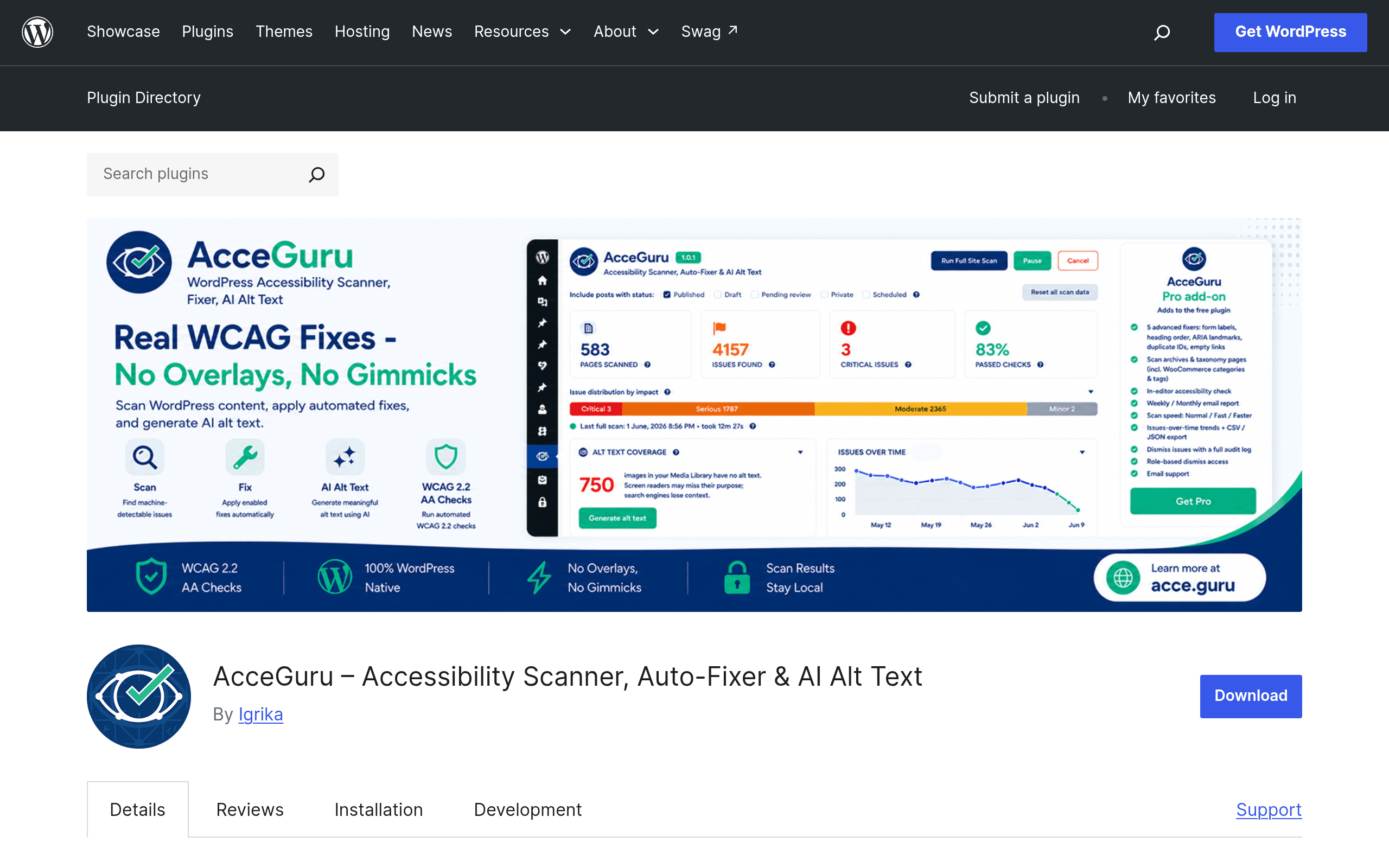
AcceGuru is a WordPress plugin, available on the official plugin directory, that scans your site's pages against WCAG 2.0, 2.1, and 2.2, plus references to ADA and Section 508 standards. The scan runs client-side in your browser rather than sending your page content off to a third-party server for evaluation, which matters if you're working on client sites under NDA or just don't want your content passing through an external API for scanning purposes.
Beyond flagging issues, AcceGuru includes automated fixers for common, mechanically-fixable problems — things like missing alt text, unlabeled form fields, or empty links/buttons that screen readers can't announce meaningfully. It also has an AI alt-text generation feature, which is the part that will matter most to anyone sitting on a large media library with no alt text at all: instead of writing 400 descriptions by hand, you can generate a first pass and edit from there.
The plugin is explicit — and this is worth taking at face value rather than glossing over — that it cannot guarantee legal compliance. Passing an automated scan is not the same as being ADA-defensible, and AcceGuru says so itself. Automated tools generally catch somewhere between 30-50% of WCAG success criteria (this is a known industry limitation, not specific to AcceGuru); things like meaningful reading order, logical heading structure in complex layouts, or whether alt text is actually accurate still need a human pass.
Pricing
- Free (WordPress.org plugin): Core scanning against WCAG/ADA/Section 508 criteria, automated fixes for common issues, and the AI alt text feature are available in the free version installed directly from the plugin directory.
- AcceGuru Pro: Sold as an add-on through acce.guru/#pricing, Pro adds faster scanning (useful once you're past a few dozen pages), scanning of archive and taxonomy pages (category/tag pages the free scanner may skip), more advanced auto-fixers, workflow tools for teams triaging issues, and reporting output — the kind of thing you'd want if you need to hand a PDF or exportable summary to a client or a compliance officer. At the time of this write-up, AcceGuru's pricing page does not publish flat numeric tiers on the page itself in a way that's scrapeable up front — you'll need to check current tier pricing directly on their site before committing, since add-on pricing for WordPress plugins in this category commonly runs anywhere from $49-$200+/year depending on site count and license scope.
If you're evaluating this today: install the free version first. Given that alt-text generation and core WCAG scanning are already in the free tier, you can genuinely test the core value proposition — does it find real issues on your actual site, and are the auto-fixes trustworthy — before paying for anything.
How it stacks up against the tools you've probably already tried
| AcceGuru | Axe DevTools | WAVE (WebAIM) | Siteimprove Accessibility Checker | |
|---|---|---|---|---|
| Price | Free plugin; Pro add-on (pricing on acce.guru, not flat-published) | Free browser extension; Axe DevTools Pro/paid team plans for CI integration | Free browser extension and free web-based checker; WAVE API is paid, usage-based | Enterprise/custom quote — typically sold as part of a broader Siteimprove platform contract |
| Where it runs | Inside WordPress admin, client-side in-browser scan | Browser extension (Chrome/Firefox) or CI pipeline via axe-core | Browser extension or wave.webaim.org URL checker | Cloud-based platform with scheduled crawls across a whole domain |
| Auto-fix capability | Yes — automated fixers for common issues (missing alt text, unlabeled fields, empty links) plus AI alt text generation | No — flags issues with code-level detail for developers to fix manually | No — flags and visually annotates issues, developer fixes manually | No — flags issues and tracks remediation progress, but fixing is manual |
| Best for | WordPress site owners/agencies wanting in-dashboard scanning plus hands-off fixes for content-level issues, especially alt text at scale | Developers who want precise, code-level WCAG violation data to fix in their own dev workflow, especially pre-launch or in CI | Fast, free spot-checks of any live URL — not WordPress-specific, good for quick audits without installing anything | Large organizations needing ongoing, site-wide monitoring, executive reporting, and accountability tracking across many pages/domains |
Who should actually install this today
Install it if: you manage a WordPress site (or several, as an agency) with a real backlog of missing alt text and basic markup issues, you want fixes applied without hand-editing every post, and you understand this is a first-pass remediation tool, not a legal compliance certificate. It's also a reasonable pick if you're privacy-conscious about scanning — the client-side/local scan model is a genuine differentiator versus tools that ship your page content to a cloud API.
Skip it (or pair it with something else) if: you need a defensible compliance audit trail for legal purposes — in that case you still want a human accessibility auditor, and possibly Siteimprove for ongoing enterprise-scale monitoring. And if you're a developer who wants granular, code-level violation detail to fix things yourself rather than have a plugin auto-patch them, Axe DevTools or WAVE will feel more precise and are already free-and-familiar tools most audits reference anyway.
The honest takeaway: AcceGuru's real value is closing the gap between "we know we have accessibility problems" and "someone actually fixed the boring 80% of them," specifically for WordPress sites, specifically around content-level issues like alt text. It's not competing with Siteimprove on enterprise governance, and it's not trying to replace Axe DevTools in a developer's testing pipeline — it's solving a narrower, very common problem: nobody on the team has time to add alt text to 400 old images, and this plugin will actually do a first pass at that today, for free.
Related guides
- iLang Readable Slugs: A WordPress Plugin That Finally Fixes Percent-Encoded URLs for Non-Latin Content
- Auditwright WCAG Accessibility Scanner: First Look at the New WordPress Plugin That Scans Rendered Pages, Not Raw HTML
- Debanics Debug Log Analyzer: First Look at the New wp-config-Free Debug Toggle Plugin