Debanics Debug Log Analyzer: First Look at the New wp-config-Free Debug Toggle Plugin
By Day Zero Guides Editorial · How we produce guides
Some links in this guide are affiliate links. If you sign up through them, Day Zero Guides may earn a commission at no extra cost to you. This never affects which products we cover or what we say about them. See our affiliate disclosure for details.
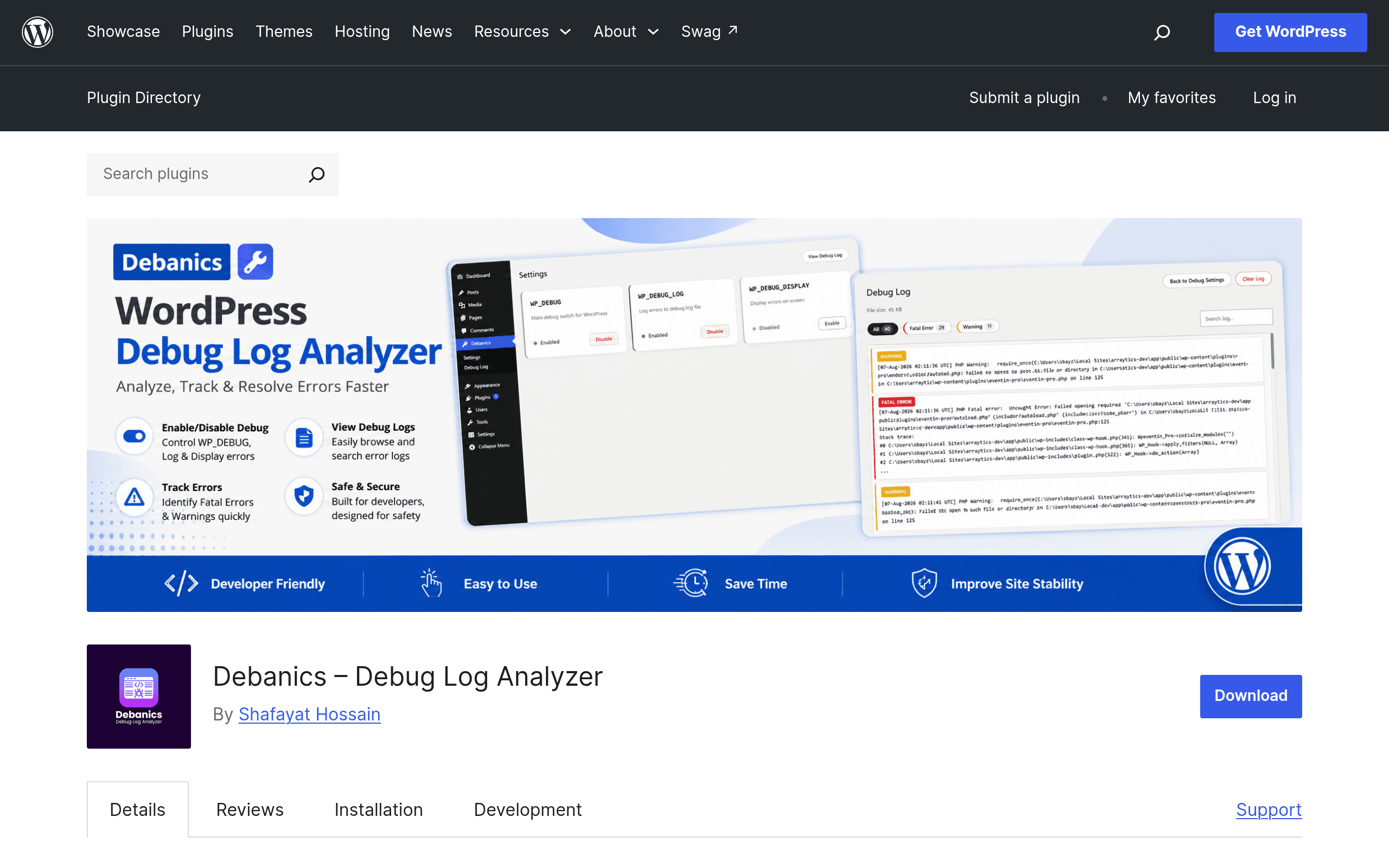
What Debanics Actually Does
Debanics — full name "Debanics – Debug Log Analyzer" — is a WordPress plugin that solves one specific, recurring annoyance: turning debugging on and off requires editing wp-config.php by hand. If you've ever SSH'd or FTP'd into a client site just to add define('WP_DEBUG', true);, then gone back in five minutes later to remove it before a visitor sees a stack trace on the homepage, this plugin is built for exactly that moment.
Once activated, Debanics adds a settings screen where you can toggle the three constants that matter most for troubleshooting:
- WP_DEBUG — the master switch for PHP error/warning/notice reporting
- WP_DEBUG_LOG — whether errors get written to
wp-content/debug.log - WP_DEBUG_DISPLAY — whether errors are printed on-screen (the one you almost never want on for live sites)
No file editing, no server access, no risk of a stray typo in wp-config.php taking the whole site down (a real risk when you're hand-editing a file that loads before WordPress itself).
The second half of the plugin is a log viewer built into the dashboard. Instead of downloading debug.log and grepping through it in a text editor, you get a searchable, filterable interface inside wp-admin — useful for spotting a specific plugin's PHP notices without scrolling past thousands of unrelated lines.
Pricing
Debanics is distributed through the official WordPress.org plugin repository, which means the version available today is free to download and use, same as any other wordpress.org-hosted plugin. As of this writing, there is no premium tier, pricing page, or upsell listed on the plugin's wordpress.org page — no published Pro version, no per-site licensing, no SaaS dashboard. If that changes (many single-purpose utility plugins eventually add a paid tier for multisite support, log export, or email alerts), it isn't reflected in the current listing. Budget for $0 today, but don't be surprised if a companion Pro add-on shows up later — that's the standard trajectory for repo plugins with this kind of focused feature set.
Who This Is For
- Freelancers and small agencies managing multiple client sites who need to debug an error report without opening a terminal or asking the client for FTP credentials.
- Site owners on managed hosting (WP Engine, Kinsta, SiteGround) where file editing via SSH is either restricted or just inconvenient through the hosting panel.
- Support/QA people who need to reproduce and read an error log but aren't comfortable editing PHP config files directly.
- Anyone debugging a white-screen-of-death where they need debug logging on just long enough to catch the fatal error, then off again immediately — Debanics turns that into a two-click operation instead of an SSH session.
It's not aimed at developers who already live in Query Monitor's query/hook panels all day — for that audience, this plugin is a lightweight companion, not a replacement.
How It Compares
| Debanics | Query Monitor | Debug Bar | WP Control | |
|---|---|---|---|---|
| Price | Free (wordpress.org) | Free (wordpress.org) | Free (wordpress.org, less actively maintained) | Free (wordpress.org) |
| Key feature | One-click toggle of WP_DEBUG/LOG/DISPLAY + in-dashboard log viewer | Full debugging panel: DB queries, hooks, HTTP requests, PHP errors, template info | Adds a debug menu with query, cache, and request info to the admin bar | Central dashboard to edit wp-config constants and manage settings across a multisite network |
| Log viewing | Built-in filter/search UI for debug.log | No dedicated log viewer — shows errors in the admin bar panel per page load | Basic error display, no persistent log search | No log viewer — focused on config editing, not log inspection |
| Setup required | Activate and toggle — no config file editing | Activate — works out of the box, deeper learning curve to use all panels | Activate — largely superseded by Query Monitor for most use cases | Best suited to multisite networks; overkill for a single site |
| Best for | Quickly enabling/reading debug logs without touching files | Deep performance and query debugging during development | Legacy projects already using it; otherwise skip in favor of Query Monitor | Managing wp-config-level settings across many sites in a network |
The honest read: Query Monitor remains the more powerful tool if you need to see slow queries, hook execution order, or enqueued scripts. Debanics doesn't compete with that — it competes with the five minutes you spend manually editing wp-config.php and then tailing a log file over FTP. Debug Bar is largely legacy at this point and most of its userbase has already migrated to Query Monitor. WP Control solves a different problem (network-wide config management for multisite) and isn't really built for single-site log reading at all.
Verdict
Debanics does one narrow thing and does it without asking much of you: it removes the wp-config.php round-trip from the debug workflow. If your current process for chasing down a PHP error involves opening an FTP client, editing a config file, reproducing the bug, downloading a log file, and then remembering to revert everything — this plugin collapses that into toggling three switches and reading the log in the same tab.
It won't replace Query Monitor if you need query-level or hook-level debugging, and it doesn't attempt to. But as a zero-cost, zero-config addition for anyone who manages WordPress sites without full server access — or who just wants to stop hand-editing wp-config.php every time something breaks — it's worth installing today. There's nothing to lose at $0, and the core use case (fast, safe debug toggling plus a readable log viewer) is solved cleanly enough to be worth the one plugin slot it takes up.
Related guides
- iLang Readable Slugs: A WordPress Plugin That Finally Fixes Percent-Encoded URLs for Non-Latin Content
- AcceGuru First Look: A WordPress-Native Accessibility Scanner That Tries to Fix What It Finds
- Auditwright WCAG Accessibility Scanner: First Look at the New WordPress Plugin That Scans Rendered Pages, Not Raw HTML